


Lean Security
for WordPress

Your wp-login.php called. It wants some privacy.

Stop losing sleep over brute force attacks and suspicious logins. ArmorPro locks down your site in minutes so you can get back to running your business.
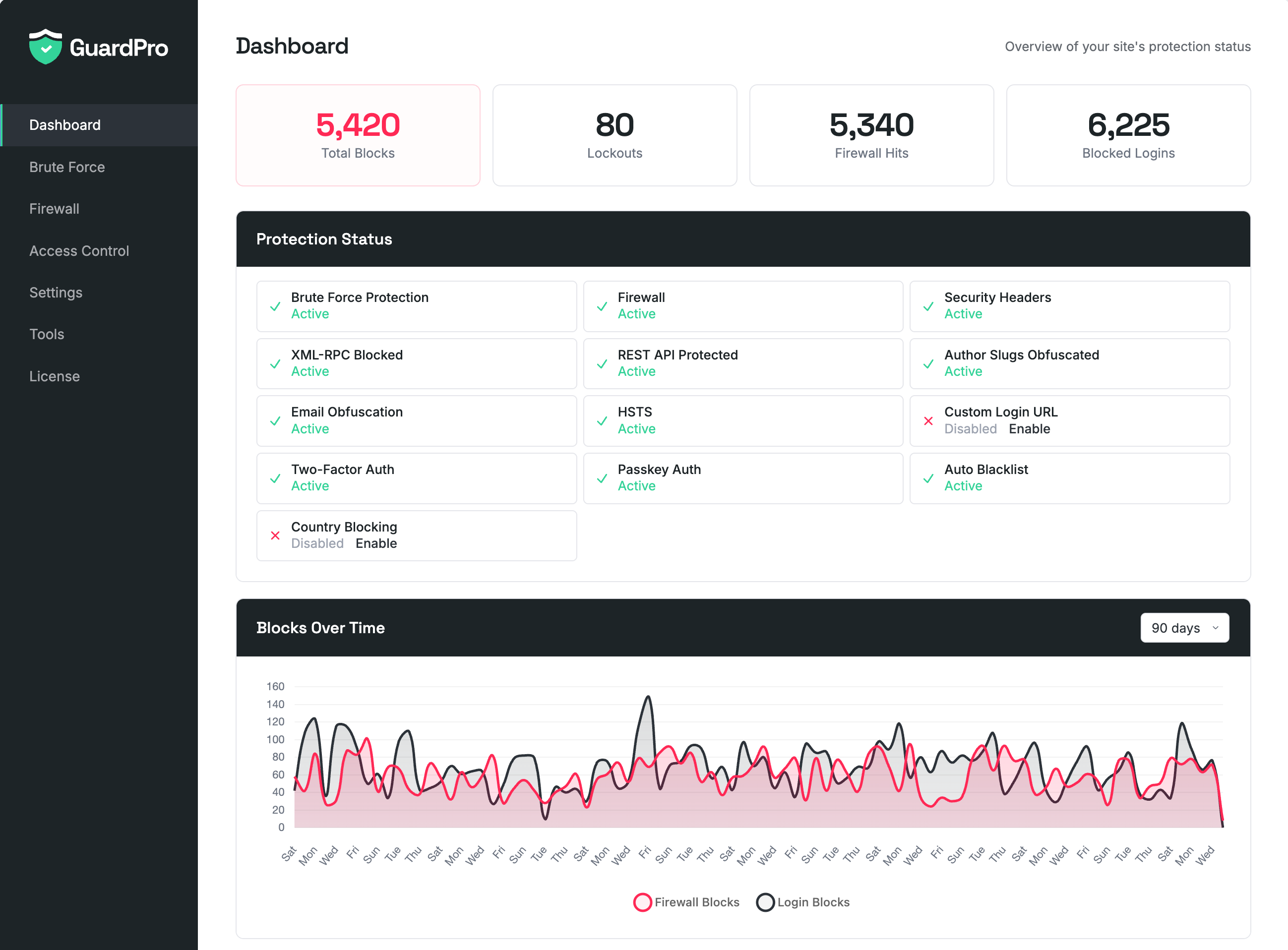
ArmorPro Dashboard

Everything Your WordPress Site Needs

We studied what actually protects WordPress sites and built only that. No fluff, no fear mongering, no feature bloat.

Brute Force Protection

Failed login tracking with configurable thresholds. Temporary IP lockouts, activity logs with status badges, and automatic permanent bans for repeat offenders.

Firewall

600+ patterns across 5 categories: request URIs, query strings, user agents, referrers, and IP addresses. Enable, disable, search, or add your own custom patterns. Hit counts for every rule.

Enhanced Firewall (WAF)

Standalone WAF that runs before WordPress loads for ~1ms overhead. Auto-detects your server type and installs itself. Blocks threats at the PHP level before any plugins or themes execute.

Two-Factor Authentication

TOTP-based 2FA with any authenticator app. Backup recovery codes and per-role enforcement so you can require 2FA for administrators while leaving subscribers optional.

Passkey Authentication

Passwordless login with Face ID, Touch ID, Windows Hello, or security keys. WebAuthn/FIDO2 standard for phishing-resistant authentication. Up to 10 passkeys per user.

Access Control

IP whitelist and blacklist with configurable expiry, inline notes, and GeoIP location. Block or allow entire countries with flag-based selection.

Security Headers

X-Content-Type-Options, X-Frame-Options, Referrer-Policy, X-XSS-Protection, HSTS, CSP, and Permissions-Policy. Automatic duplicate header removal.

Login & Privacy

Hide wp-login.php with a custom login URL. Hide author slugs to protect usernames. Email obfuscation to stop scrapers from harvesting addresses.

Activity Dashboard

90-day security charts with visual trends for login blocks and firewall matches. Stats overview with quick enable/disable toggles for every feature at a glance.

Email Notifications

Daily or weekly email digests with alerts for blocked IPs, firewall threats, and admin logins. Configure which alert types to include and who receives them.

Why ArmorPro?

We built ArmorPro to be the WordPress security plugin we always wanted: powerful protection with a clean, minimal interface. No bloat, no unnecessary features, just the essentials done right.

Every feature earns its place. Every screen is designed for clarity. The result is a WordPress plugin that's both effective and enjoyable to use.

Clean, intuitive interface you'll actually enjoy using
Lightweight codebase that won't slow your site
Only the features you need, nothing you don't

Setup Time

0min

ArmorPro

0min

Others

Database Queries

0

ArmorPro

0

Others

Trusted by WordPress professionals

The WordPress security plugin designed with developers and site owners in mind.

"Finally a security plugin that doesn't make my site feel like its running through molasses. Set it up in 5 minutes and haven't thought about it since."
S

Sarah Chen

Freelance Developer

ArmorPro
"The UI is gorgeous. Clean, minimal, everything is exactly where you'd expect it to be. Its rare to find a WordPress plugin that actually feels well designed."
D

David Park

Web Designer

ArmorPro
"I manage 40+ client sites and ArmorPro is on every single one. Lightweight, effective, and I never have to explain a compicated settings page to clients."
R

Rachel Torres

Agency Owner

ArmorPro

Get ArmorPro

Every feature, on as many sites as you like. Nothing to activate, nothing held back.

Free

No trial, no account, no licence key. Unlimited sites.

  • String-matching firewall with 600+ patterns and Enhanced WAF mode
  • Brute force protection with auto-blacklist
  • Security headers, 2FA, and passkey login
  • Email notifications and activity dashboard

Frequently Asked Questions

Nope. We obsess over WordPress performance. ArmorPro adds roughly 15ms to page load time and runs just 2 database queries. It's built to be lightweight from the ground up—the way WordPress security plugins should be.
Yes! ArmorPro plays nicely with WP Rocket, W3 Total Cache, LiteSpeed Cache, and pretty much every WordPress caching solution out there. We've tested extensively to make sure there are no conflicts.
ArmorPro includes a string-matching firewall with 600+ patterns across 5 categories and per-pattern management, plus an Enhanced Firewall (WAF) mode that runs before WordPress loads with ~1ms overhead. Also includes brute force protection with IP logging, security headers management (including HSTS, CSP, and Permissions-Policy), REST API protection, activity logs, two-factor authentication (TOTP), passkey authentication (WebAuthn/FIDO2), country blocking, custom login URL, email notifications, auto-blacklisting of repeat offenders, and CSV export. All features are included in every tier.
ArmorPro uses a string-matching firewall with 600+ patterns across 5 categories: SQL injection and malicious query strings, dangerous request URIs (shell files, config access, exploit paths), known malicious user agents (120+ scanners, scrapers, attack tools), spam referrers, and IP address patterns. Each pattern can be individually enabled or disabled through the Pattern Manager with hit counts. You can also add your own custom patterns. The Enhanced Firewall (WAF) mode runs as a standalone PHP engine before WordPress loads via auto_prepend_file, adding only ~1ms of overhead. It also blocks XML-RPC requests and enforces REST API authentication.
ArmorPro includes TOTP-based two-factor authentication for WordPress that works with any authenticator app (Google Authenticator, 1Password, Authy, etc.). Each WordPress user sets up 2FA from their profile with a QR code scan. Backup codes are provided for account recovery. Admins can require 2FA for specific WordPress user roles.
Passkeys are a modern, passwordless authentication method using the WebAuthn/FIDO2 standard. Instead of typing a password, users authenticate with Face ID, Touch ID, Windows Hello, or a hardware security key. Passkeys are phishing-resistant since they're bound to the specific website and can't be reused elsewhere. Each user can register multiple passkeys (up to 10) from their profile page.

Pricing & Licensing

Yes. ArmorPro, CitedPro, and BoostPro are free to download and use, with every feature switched on. No trial period, no locked panels, no site limits, and no upgrade nags. The only thing you can pay us for is the optional SRWorks AI subscription.
AI content generation in CitedPro (meta descriptions, schema, llms.txt), AI performance recommendations in BoostPro, a higher PageSpeed testing allowance, priority email support, and every AI feature we add later. One key covers both plugins. Everything else in the plugins works without it, and if you would rather bring your own AI provider you can do that instead — the subscription is the option for people who want it handled.
Everything except AI generation. The full SEO suite, sitemaps, schema, llms.txt, AI bot tracking, page caching, image optimization, unused CSS removal, the firewall, two-factor authentication, passkeys, country blocking, and every other feature works with no subscription. BoostPro's PageSpeed score is free too. ArmorPro has no AI features at all, so it never needs one. On WordPress 7.0 or later you can also run the AI features on your own connected AI provider instead of subscribing — see below.
Yes. WordPress 7.0 added a built-in AI Client, and if you connect your own provider — Anthropic, OpenAI or Google — under Settings → Connectors, the AI features in BoostPro and CitedPro use it automatically. No subscription, no key from us, and you pay your provider directly for what you use. SRWorks AI is there for people who would rather not open an API account and manage billing with a model provider; if you already have one, use it. If you have both, the subscription takes precedence, so your own provider is never charged for something you have already paid us for. Requires WordPress 7.0 or later — on earlier versions the subscription is the only option.
One test a day per site, plus an automatic test every week. With SRWorks AI that becomes ten a day and an automatic test daily. The limit exists because Google gives us a fixed number of PageSpeed requests per day shared across every BoostPro install, and it cannot be bought in larger amounts — rationing it is what lets us give the score away instead of charging for it. Re-testing the same page is served from cache and does not count against your allowance.
Yes. SRWorks AI is a single subscription that unlocks the AI features in CitedPro and BoostPro, plus every AI feature we add later. One key, one renewal, no per-plugin maths.
Yes. Personal covers 1 site, Business covers up to 5, and Agency covers up to 100. All three tiers unlock exactly the same AI features. You can upgrade at any time and only pay the prorated difference.
The plugins keep working exactly as before, forever. You lose access to the AI generation features until you renew, and nothing else changes. Your settings, logs, and generated content are never touched.
Because the cost is ongoing. Every AI generation is a request we pay for, so a one-time fee would mean either capping your usage hard or losing money on the people who get the most value. An annual subscription keeps it honest in both directions.
We use Polar as our merchant of record, powered by Stripe for secure payment processing. You can pay with all major credit cards (Visa, Mastercard, American Express, Discover) or PayPal. All transactions are encrypted and PCI compliant.
Absolutely. You're fully protected by our 30-day money-back guarantee. If you're not happy, we'll refund your purchase—no questions asked. See our refund policy for full details.
Yes! Earn 20% commission for the first 12 months of any referred SRWorks AI subscription and 10% on every renewal after that. It's free to join with no approval wait times. Visit our affiliates page to learn more and sign up.

Have more questions? Contact us or visit our full FAQ.