The most efficient WordPress optimizer. Every millisecond matters.
Slow pages cost you visitors, rankings, and revenue. BoostPro gets your Core Web Vitals in shape so every page loads fast and every visitor sticks around.
No bloat, no experimental features shipped as defaults. Just the WordPress optimizations that reliably make sites faster, with smart defaults that work on most setups out of the box.
Page Caching
File-based HTML caching serves fully rendered pages directly from disk, bypassing PHP and WordPress entirely. Smart exclusions for logged-in users, carts, and dynamic pages. Configurable TTL and one-click purge across BoostPro plus 19 third-party caches.
Remove Unused CSS
Per-URL tree-shaking strips out every style your page doesn't use. Choose to inline the optimized CSS or serve it as an external file. Minify what's left and inline small background images as data URIs.
JavaScript Optimization
Per-script defer control, JS minification, and delay non-critical scripts until first user interaction. 28+ quick exclusion presets for popular plugins auto-detected on your site.
WebP & AVIF Conversion
Convert JPEG and PNG images to WebP and AVIF formats. AVIF delivers 20-50% smaller files than WebP. Bulk optimize, auto-convert on upload, or optimize individual images from the Media Library.
Lazy Loading & Video Placeholders
Browser-native lazy loading for images and iframes below the fold. Replace YouTube and Vimeo embeds with lightweight thumbnails that load the real player on click. Auto-add missing dimensions to prevent layout shifts.
Font Optimization
Download and serve Google Fonts locally for privacy and speed. Preload critical .woff2 files so fonts start downloading immediately. Add font-display: swap to prevent invisible text during load.
Connection & Preloading
Auto-detect external domains and add preconnect hints. Auto-preload your LCP hero image for faster Largest Contentful Paint. Define advanced preload rules with device targeting and page conditions.
Speculative Loading
Use the browser Speculation Rules API to prefetch or prerender pages before visitors click. Configurable eagerness levels let you balance speed gains with resource usage.
Resource Manager
Disable any JavaScript or CSS asset on a per-page, per-post-type, or site-wide basis from a frontend slide-in panel. See every script and stylesheet grouped by source with scoping rules and testing mode.
Resource Cleanup
Remove wp-emoji scripts, oEmbed discovery, jQuery Migrate, and query strings from static assets. Control WordPress Heartbeat API frequency on frontend, admin, and post editor independently.
Database Cleanup
One-click or scheduled removal of post revisions, auto-drafts, trashed posts, spam comments, expired transients, and orphaned metadata. Set it and forget it with daily, weekly, or monthly schedules.
CDN Rewriting
Automatically rewrite static asset URLs to serve images, CSS, JS, fonts, and media files from your CDN. Configure which directories to include and exclude specific URLs. Works with any pull-zone CDN provider.
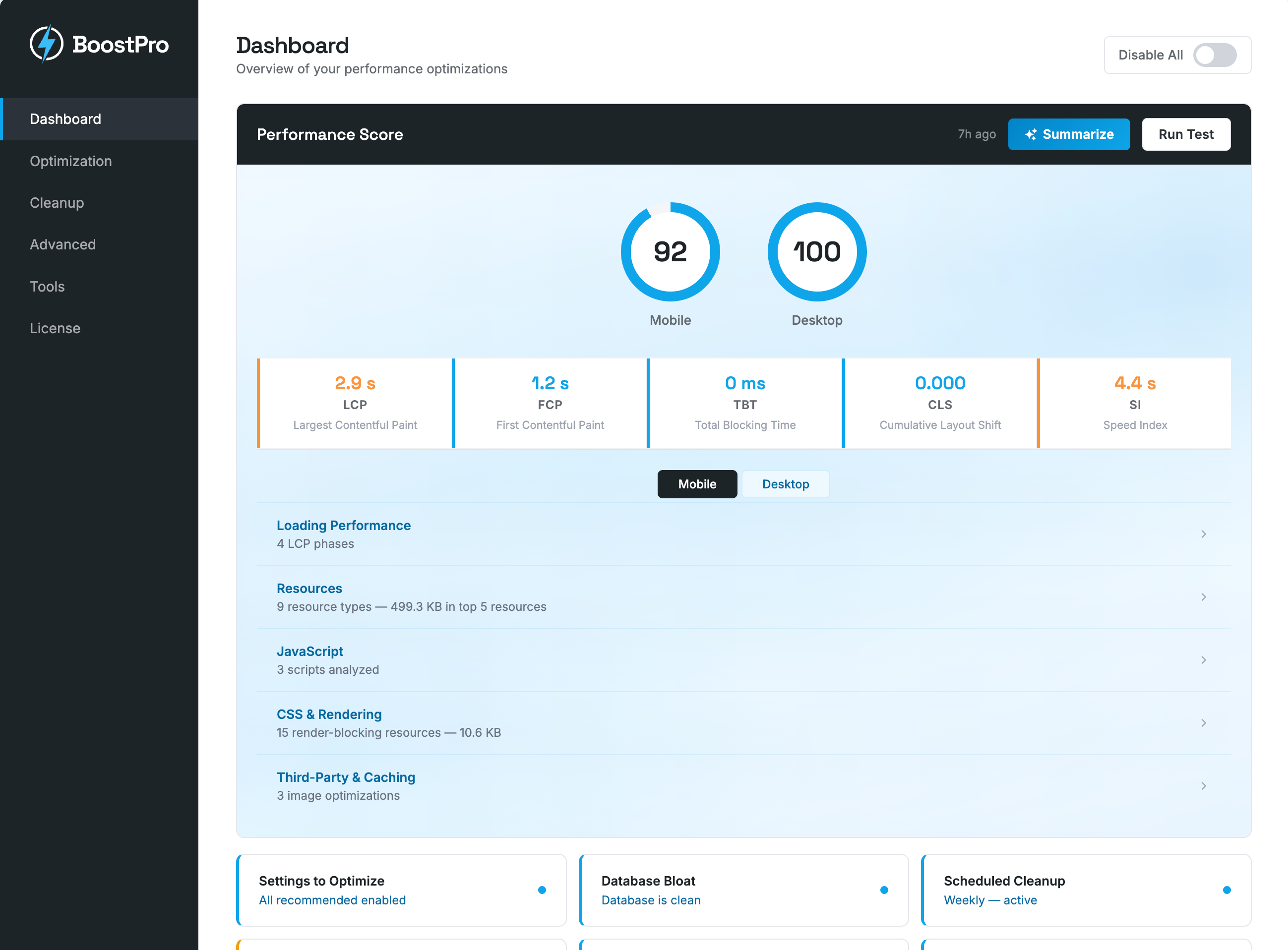
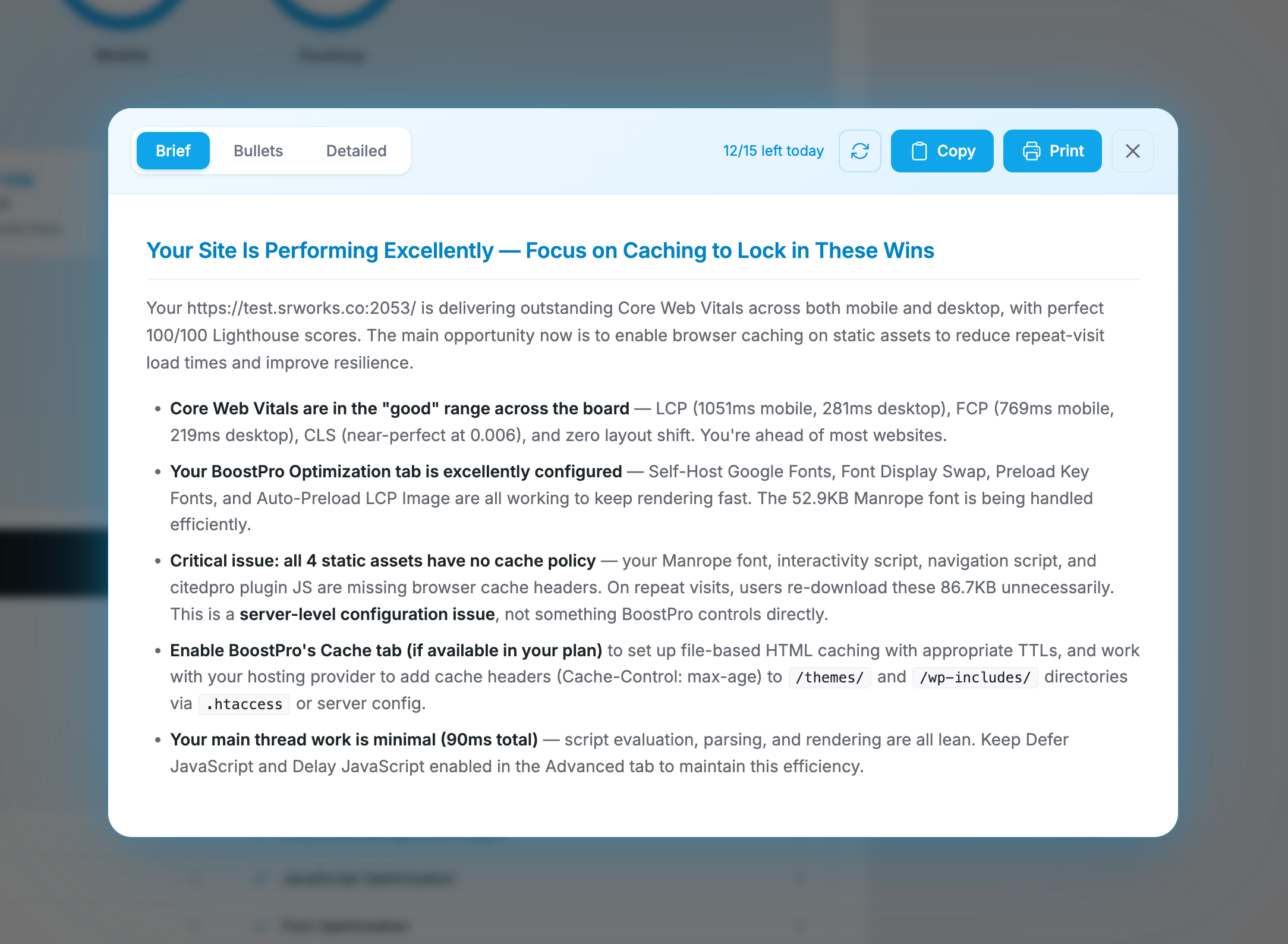
Built-in PageSpeed testing with AI analysis
Run a Google PageSpeed test from your dashboard — free, no key needed. For a plain-English summary of what the numbers mean and which fixes matter most, add SR WORKS AI — or, on WordPress 7.0, connect your own AI provider under Settings → Connectors and use it with no subscription at all.
A Different Approach
Most performance plugins try to be everything. We built BoostPro to be the focused, efficient layer that sits alongside your existing stack.
Approach
BoostPro
"All-in-One" Plugins
"Caching-Only" Plugins
Built-in page caching
Smart defaults out of the box
Per-script JS defer control
N/A
Built-in WebP & AVIF image optimization
Sometimes
Remove unused CSS per URL
Sometimes
AI-powered PageSpeed analysis (SR WORKS AI, or your own AI provider on WordPress 7.0)
Database cleanup & scheduling
Sometimes
Local Google Fonts hosting
Sometimes
Frontend resource manager
Sometimes
Price
Free
$50+/month
Varies
Get BoostPro
Every feature, on as many sites as you like. The AI features run on a hosted service, so that part is a subscription.
Free
No trial, no account, no licence key. Unlimited sites.
Billed yearly, renews annually. 30-day money-back guarantee. Cancel any time — the plugin keeps working.
Frequently Asked Questions
BoostPro is designed to minimize that risk. The default settings are conservative and work well on the vast majority of WordPress sites. Core features like page caching, lazy loading, emoji cleanup, and heartbeat control are low risk and rarely cause issues. The advanced options (JS defer, unused CSS removal, CSS/JS minification) can push performance further, but we recommend testing them on a staging site first since every theme and plugin combination is different.
BoostPro includes file-based page caching that saves fully rendered HTML pages to disk and serves them directly on subsequent visits, bypassing PHP and WordPress entirely. It automatically excludes logged-in users, POST requests, WooCommerce carts, and pages that set the DONOTCACHEPAGE constant. You can configure the cache expiry, add custom URL exclusions, and the cache is automatically purged when you update content. If your host already provides server-level caching, BoostPro detects the conflict and disables its own cache to avoid issues.
BoostPro includes file-based page caching with configurable expiry and third-party cache purging (19+ systems), smart lazy loading for images, iframes, and CSS background images with exclusion patterns, remove unused CSS per URL with delivery options, CSS and JavaScript minification, WebP and AVIF image conversion with bulk optimization and image resizing, per-image optimize/delete from the Media Library, video placeholders for YouTube and Vimeo, add missing image dimensions, local Google Fonts hosting with font preloading, emoji and embed cleanup, heartbeat control (frontend/admin/editor independently), remove query strings, per-script JavaScript defer and delay with 28+ quick exclusion presets, speculative loading, auto-preconnect, advanced preload rules, auto-preload LCP image, CDN URL rewriting for static assets, a frontend Resource Manager for disabling scripts and styles per page, per-page/post disable controls, admin bar integration, global killswitch, scheduled database cleanup, and WP-CLI commands. All features are included in every tier.
Yes. BoostPro automatically detects when you're editing in Elementor, Divi, Beaver Builder, Brizy, Bricks, and other page builders and disables its optimizations during editing so they don't interfere with the builder interface. On the frontend, all optimizations apply normally. If you run into a visual issue on a specific page, use the per-page disable controls to turn off individual features for that URL.
BoostPro's Remove Unused CSS (RUCSS) analyzes each URL on your site and strips out CSS rules that the page doesn't use. The optimized CSS can be inlined directly into the page or served as a separate file. You control how original stylesheets are handled: load them asynchronously, delay them until user interaction, or remove them entirely. Specific stylesheets and selectors can be excluded to protect dynamic styles. Results are cached per URL so subsequent visits are served instantly.
BoostPro converts your JPEG and PNG images to WebP and AVIF formats using your server's GD or ImageMagick library. No external API or cloud service required. You can bulk optimize your entire media library, enable auto-optimize on upload, or optimize individual images from the Media Library. Original files are always preserved. Converted files are stored separately and served automatically via .htaccess rewrite rules (Apache/LiteSpeed) or picture tags (Nginx), with AVIF preferred when the browser supports it. A single quality preset maps to optimized values for each format.
BoostPro scans for 27 plugins that overlap with its features, including caching plugins, image optimizers, lazy loading plugins, and minification tools. When it finds one, it shows an admin notice with a one-click deactivation link for each conflicting plugin. For caching plugins specifically, BoostPro hard-blocks its own page cache toggle until the conflict is resolved, so you never end up with two caching layers fighting each other.
Yes. BoostPro automatically detects server-level caching from hosts like WP Engine, Kinsta, Cloudways, and SiteGround. When it finds one, it disables its own page cache to avoid conflicts and focuses on the optimizations your host doesn't provide: lazy loading, resource cleanup, font optimization, CSS optimization, and database maintenance. No duplicate functionality, no stale content issues.
AVIF is a next-generation image format that typically produces files 20-50% smaller than WebP at equivalent visual quality. BoostPro can convert images to both formats simultaneously. When serving images, browsers that support AVIF get the smallest file, while older browsers fall back to WebP or the original. AVIF conversion requires PHP 8.1+ with GD or ImageMagick AVIF support.
BoostPro automatically rewrites static asset URLs (images, CSS, JS, fonts, media files) to serve from your CDN instead of your origin server. Enter your CDN pull zone URL, choose which directories to include (defaults to wp-content and wp-includes), and optionally exclude specific URL patterns. Works with any pull-zone CDN provider like Cloudflare, BunnyCDN, KeyCDN, or StackPath.
The Resource Manager is a frontend tool that lets you disable any JavaScript or CSS asset on a per-page, per-post-type, or site-wide basis. Access it from the admin bar on any page. A slide-in panel shows every script and stylesheet loaded, grouped by source (plugins, theme, WordPress core). Toggle assets off, set scoping rules, and add exceptions. Includes a testing mode so changes only apply to logged-in admins until you're ready to go live.
Pricing & Licensing
Yes. ArmorPro, CitedPro, and BoostPro are free to download and use, with every feature switched on. No trial period, no locked panels, no site limits, and no upgrade nags. The only thing you can pay us for is the optional SR WORKS AI subscription.
AI content generation in CitedPro (meta descriptions, schema, llms.txt), AI performance recommendations in BoostPro, a higher PageSpeed testing allowance, priority email support, and every AI feature we add later. One key covers both plugins. Everything else in the plugins works without it, and if you would rather bring your own AI provider you can do that instead — the subscription is the option for people who want it handled.
Everything except AI generation. The full SEO suite, sitemaps, schema, llms.txt, AI bot tracking, page caching, image optimization, unused CSS removal, the firewall, two-factor authentication, passkeys, country blocking, and every other feature works with no subscription. BoostPro's PageSpeed score is free too. ArmorPro has no AI features at all, so it never needs one. On WordPress 7.0 or later you can also run the AI features on your own connected AI provider instead of subscribing — see below.
Yes. WordPress 7.0 added a built-in AI Client, and if you connect your own provider — Anthropic, OpenAI or Google — under Settings → Connectors, the AI features in BoostPro and CitedPro use it automatically. No subscription, no key from us, and you pay your provider directly for what you use. SR WORKS AI is there for people who would rather not open an API account and manage billing with a model provider; if you already have one, use it. If you have both, the subscription takes precedence, so your own provider is never charged for something you have already paid us for. Requires WordPress 7.0 or later — on earlier versions the subscription is the only option.
One test a day per site, plus an automatic test every week. With SR WORKS AI that becomes ten a day and an automatic test daily. The limit exists because Google gives us a fixed number of PageSpeed requests per day shared across every BoostPro install, and it cannot be bought in larger amounts — rationing it is what lets us give the score away instead of charging for it. Re-testing the same page is served from cache and does not count against your allowance.
Yes. SR WORKS AI is a single subscription that unlocks the AI features in CitedPro and BoostPro, plus every AI feature we add later. One key, one renewal, no per-plugin maths.
Yes. Personal covers 1 site, Business covers up to 5, and Agency covers up to 100. All three tiers unlock exactly the same AI features. You can upgrade at any time and only pay the prorated difference.
The plugins keep working exactly as before, forever. You lose access to the AI generation features until you renew, and nothing else changes. Your settings, logs, and generated content are never touched.
Because the cost is ongoing. Every AI generation is a request we pay for, so a one-time fee would mean either capping your usage hard or losing money on the people who get the most value. An annual subscription keeps it honest in both directions.
We use Polar as our merchant of record, powered by Stripe for secure payment processing. You can pay with all major credit cards (Visa, Mastercard, American Express, Discover) or PayPal. All transactions are encrypted and PCI compliant.
Absolutely. You're fully protected by our 30-day money-back guarantee. If you're not happy, we'll refund your purchase—no questions asked. See our refund policy for full details.
Yes! Earn 20% commission for the first 12 months of any referred SR WORKS AI subscription and 10% on every renewal after that. It's free to join with no approval wait times. Visit our affiliates page to learn more and sign up.